Saturday, May 23, 2015

sqm-scripts on Linksys WRT1900AC (part 1)

more actual context later, for now, I just wanted to make a quick post with some numbers from tonights tests.


  • Comcast Blast! (120Mbps/12Mbps) internet service
  • Arris AB6141 modem
  • Linksys WRT1900AC router
Stock firmware:

full speed, but a fair bit of latency (although honestly, 120ms is pretty good compared to most stock setups)


After:


And what's even better?  Wireless is pretty awesome, too:


Tuesday, February 3, 2015

Thoughts on Iot: Products and Novelties

To be successful, you need a product

The Internet Refrigerator is a meme that gets a lot of jeers, but I think at the core of those jeers is the fact that it seemed like a solution looking for a problem.  To me, most of IoT feels like this (especially most of the stuff at CES).

Early devices like the toaster were done because they could be done.  Dares and fun side projects.  But they weren't real products that solved someone else's problems or filled a need.

I've seen a lot of kickstarters and startup companies go after home automation without really having a product or service that solved a real problem.  And those have mostly faded away.  The compelling reasons to use the products aren't there, leaving them as no more than novelties.

This is, perhaps, the genius of the Nest.  It's a thermostat (boring), made to look beautiful (yes, a novelty), but with remote access, and the smarts to learn your schedule instead of you telling it your schedule.  The goal is clear, the execution is beautiful, and now that they've had time to refine the results, everyone I know with one loves it.

I have an internet-enabled bathroom scale from Withings.  Yes, really.  What it offers is that it remembers my weight, every time I step on it.  And it gives me that data later, graphed over time.  And it does the same for my heart rate and some other health-related data.  The problem it solves is that I hate data entry, which is why I never was very good at tracking my weight in the past.  Now it's tracked for me, automatically.  And now I have a handy reference for some of my vital stats.

These are useful products, even if still overly expensive and luxury items.  But the electronics are just going to keep getting cheaper.  But if the business proposition doesn't fill a need, just is "X plus the internet", I don't see it ever really being more than a novelty today, and tomorrow's humorous internet meme.

Monday, February 2, 2015

Thoughts on IoT: Introduction and Hurdles

The Internet of Things is about connecting devices.  To what?  To everything.  It's not about making toasters or refrigerators that are "internet-enabled", it's about connecting devices to everything else.  And the internet is the doorway to "everything else".

Nearly a decade ago, when I entered this space, I hadn't realized quite what it was going to turn into.  Since then, I've seen a bunch of ideas come and go (and some come back again).  The core problems really haven't changed, and the solutions are getting better every year.

This is the first in a series of posts about the Internet of Things: lessons I've learned from it, the hurdles for anyone in the space, problems that I think we need to solve, and where I'd like to see things go in the future.

These aren't likely to be in any particular order, and the list below isn't in one, either.  Of these, most of them are the hurdles I mentioned in the title.  These are the problems that need to be solved in IoT.


Successful products and services vs. novelties - Most IoT devices seem like novelties, and that's a fair argument to make.  I think we're still in a phase where we're still exploring what we can do, and trying to build solutions to real problems.

Communication within the home - This is mostly about engineering the solution, but also about standards and communications.  This is a really hard problem to solve neatly, in a way that works in the "real world".

Communication from the device to the cloud - Talking out can be easy (if you have TCP/IP), but trying to communicate back to the devices gets a lot more complicated in a hurry, given the current state of home networking.

Security
- Security is always hard, and IoT marries some things that expose new problems:  embedded device security, network security, and data security (let alone issues of data privacy)

Data - As we connect more devices to the internet, and start trying to do things with their data, we're going to need to deal with that data:  ownership, storage, search, privacy, analytics, automation, etc.

Interoperability - It's not really an internet of things if the things can't talk with each other (or their clouds can't).  The Hue is a very expensive, smartphone-controlled lightbulb by itself.  But it could be 
so much more if other things could talk to it.


    I don't see any one company solving all of these, or any one consortium, either.  But as an industry, as builders of the internet and the devices that we connect to it, we'll need to be solving these issues for the Internet of Things to really bloom in it's full potential.

    Sunday, September 28, 2014

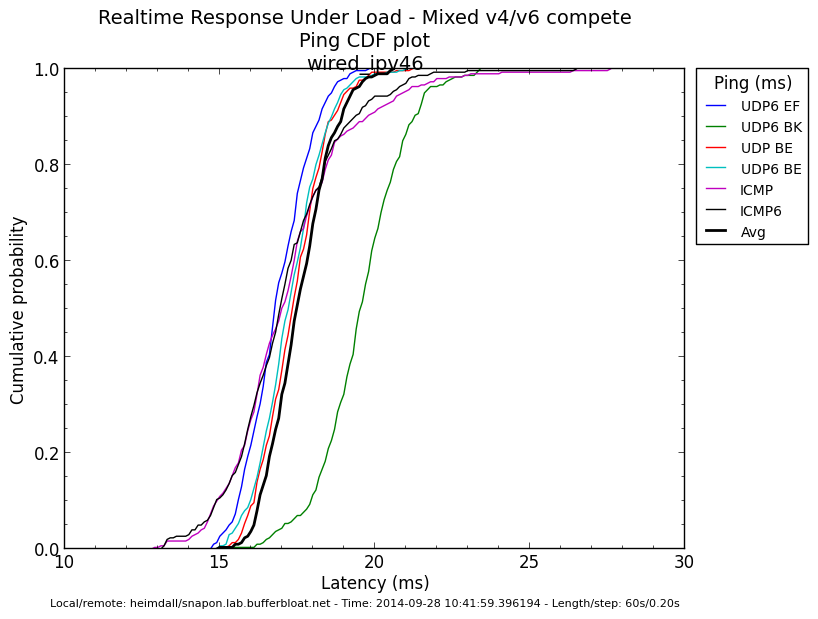
    Comcast IPv6 rrul tests

    These are just some raw results, I haven't done any tuning (need to do other things today), but I finally got around to contacting Comcast support, and getting the modem switched to full bridge mode.  Since it's their combo modem/AP/router/voip unit, support has to do it on the backend.  But live-chat support was able to do it (and able stay operational through all the ip address changes, which was nice).

    But the WNDR3800 is certainly at (past) the edge of what it can handle at these data-rates when using the simple.qos scripts at:

    download (ingress):  100000
    upload (egress):  12000
    squash ingress DSCP
    ECN enabled in both directions (but not enabled on the local end of the test)


    So, here's a bunch of graphs:


    Friday, August 29, 2014

    New Comcast Speeds -> New CeroWRT SQM Settings

    Comcast upped their line-rates in my area recently, which meant I needed to up the settings I use with CeroWRT to harness that bandwidth with reasonable latency (vs. the unreasonable latency that the cablemodems have by default).

    Our service was previously 50/10 Mbps (nominal), although in practice I saw that it was a bit above that (maybe 10% or so).  Comcast just upped that to 100/10 (nominal).

    Raw testing:


    The raw rates (laptop plugged directly into the modem) show 120Mbps down, 10 up, and 120ms of bufferbloat latency.  These are both improvements over the previous setup.  I'm wondering if the modem is now running PIE...  The latency is about half what it was when I set the service up back in May.

    And 120Mbps is awfully nice...

    But the WNDR3800 was set for slower settings:


    Wonderful (lack of) latency, but 50Mbps is a lot less than 120Mbps, so time to start upping the download rate limiting and see what the unit can do:


    Unfortunately, the WNDR3800 just doesn't have the processing power to pull off much more than 50Mbps (as I previously knew).  Setting the download rate at 100Mbps, it can only manage about 70-75Mbps, and the graphs are noisy enough to show that the unit isn't able to correctly run the algorithms.

    Final settings:
    CeroWrt Toronto 3.10.36-4
    fq_codel
    100000 Kbps ingress limit
    12000 Kbps egress limit
    ECN enabled (both directions)


    Addendum:  I tried to disable downstream shaping, to see if that would control latency well enough on the upstream side.  The results were not confidence-inspiring:


    Certainly much better than with no upstream shaping, but the extra latency goes from 5ms to 15ms, and the sharing/fairness of the streams comes apart.

    If only Comcast would just fix this in the CMTS and in the modems, instead of forcing us to do this on our own...

    Monday, July 7, 2014

    NuForce Dia Amplifier: Binding Post Replacement

    I have a NuForce Dia that I picked up while we were in France, to drive some bookshelf-sized speakers in the apartment there.  It's a nice, small (ok, tiny), amplifier.  Class-D, 24Wx2 into 4 ohms.  It's not much bigger than the Apple TV that was feeding it.


    It sounds great, and easily fills smaller spaces (and not so small spaces), but it's not going to ever be punchy.

    Except, it uses spring-clip style binding posts:

    As spring-clips go, they're pretty good, but it's not a style of interconnect that I really care much for.  Especially when the very nice speaker cables that I have already have banana plugs crimped/soldered onto them.

    So, I ordered some new posts from Parts Express, and then went to work.

    4 screws front and back, and a thin nut under the volume knob holds everything together.  Then the board slides right out.


    It looks like NuForce has some rather custom components inside.

    Anyway, the big question is how the binding posts are held in:


    Which are just screws.  But access is blocked by the components on the board, so 4 more screws to remove the PCB from the metal tray, and then we can unscrew the wires from the binding posts.


    The new binding posts had tabs, which weren't necessary as the ring terminals on the leads from the PCB just fit.


    And then it goes back together the reverse of how it came apart.


    Total time?   Less than 30 minutes, including the time to stop and take photos as I went.
    <30 and="" including="" minutes="" p="" photos.="" stop="" take="" taking="" time="" to="">
    And it sounds pretty fantastic with the Maggies.  The Magnepan MMGs are maybe a bit bright, and this amp really provides a lot of detail for them to resolve.  Overall, I'd say they're a good match.  But more listening is required (more listening is always required).

    Tuesday, May 27, 2014

    Disabling shaping in one direction with CeroWRT

    Another test Dave Taht asked for was to disable the downstream shaper and see what happened.  It wasn't pretty.  So I also disabled the upstream shaper.  Also not pretty.  Then I went back to using the shaper enabled in both directions.

    Baseline using fq_codel and 54.5Mbps downstream limit and 10Mbps upstream limit:


    Now, turning off the downstream shaper yields:


    This indicates (to me), that there's very excessive buffering at the CMTS, and the downstream shaper is badly needed to keep it under control.

    So I re-enabled downstream, and disabled the upstream shaper:


    Again, not ideal.  It's interesting seeing how the shapers interact with the traffic in the other direction as well.  Because their ACKs are going through the other path, disabling shaping on one clearly effects the other.